How to Measure a Laptop (Screen Size and Body Size)
Direct Answer: Learning how to measure a laptop involves two separate measurements: for screen size, measure diagonally across the active display from corner to corner (excluding bezels). For a laptop sleeve or bag, close the lid and measure the outer dimensions: Width × Depth × Thickness.
How to Measure Laptop Screen Size vs. Closed Exterior
Measurement Reference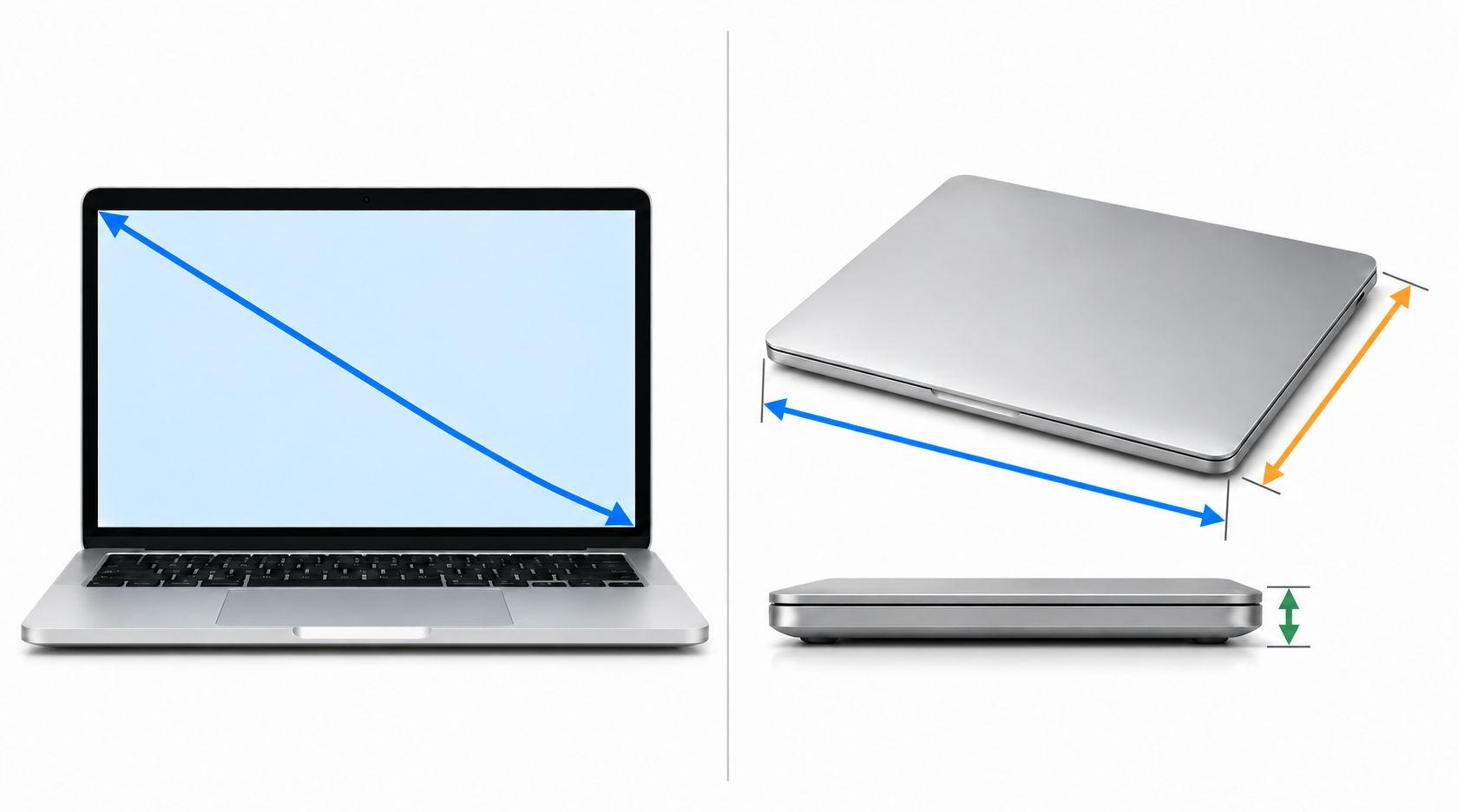
Measure the active screen only. Exclude the bezel.
Measure the closed laptop, including protrusions and feet.
Screen diagonal: Measure straight across the glowing display from corner to corner (do not include the outer bezel).
Turn the Screen On
Wake up your laptop so you can clearly see where the bright screen ends and the black border begins.
Measure Corner to Corner
Stretch your tape diagonally from the top-left corner of the display glass to the bottom-right corner.
Close Lid for Bag Sizing
Buying a bag or sleeve? Never go by screen size alone—close the laptop and measure Width, Depth, and Thickness.
How Do You Measure a Laptop Size and Bag Fit?
Pick a tool below to calculate your screen diagonal or check if your laptop fits a bag.
Measure only the lit-up screen area (do not include the outer bezel frame).
Quick Check: Right vs. Wrong Way
Do This
- •Measure the screen diagonally from corner to corner (that's how 13.3", 14", 15.6", and 16" laptops are named).
- •Measure the closed laptop body (Width × Depth × Thickness) before buying any sleeve or backpack.
- •Include back vents and rubber feet when measuring gaming laptops, as cooling bumps stick out behind the hinge.
Avoid These Mistakes
- •Don't measure the screen straight across—a 15.6" screen is only 13.6" wide horizontally, which tricks people into thinking they have a 13" laptop!
- •Don't include the black bezel border when measuring screen size—measure only the glass area that lights up.
- •Don't trust "Fits 15-inch Laptop" bag labels blindly—older or gaming laptops have thicker bodies that won't fit slim sleeves.
How Do You Measure a Laptop: Standard Screen & Body Size Chart
| Laptop Class | Diagonal Screen | Typical Body Width | Typical Body Depth |
|---|---|---|---|
| 13-Inch (13.3" / 13.6") | 13.3" (33.8 cm) | 11.9" – 12.0" | 8.3" – 8.5" |
| 14-Inch (14.0" / 14.2") | 14.0" (35.6 cm) | 12.3" – 12.8" | 8.7" – 9.0" |
| 15-Inch (15.6") | 15.6" (39.6 cm) | 14.0" – 14.4" | 9.2" – 9.8" |
| 16-Inch (16.0") | 16.0" (40.6 cm) | 14.0" – 14.3" | 9.7" – 10.2" |
| 17-Inch (17.3") | 17.3" (43.9 cm) | 15.5" – 16.3" | 10.2" – 11.0" |
Frequently Asked Questions
How do I measure a laptop screen size?
Measure diagonally from one corner of the visible screen to the opposite corner, not including the bezel. The result in inches (for example 15.6) is the advertised screen size.
Is screen size the same as laptop size?
No. Screen size is only the display diagonal. The laptop body is larger and depends on bezel thickness and design, so two 15.6 inch laptops can have different widths and depths.
How do I measure a laptop for a case or sleeve?
Close the laptop and measure its width, depth and thickness. Choose a case or sleeve whose inside size is just slightly larger than those numbers. Matching only the screen size is not enough.
How do I calculate screen size from width and height?
Use the Pythagorean theorem: diagonal = square root of (width squared + height squared). Measure the screen's width and height in inches, then enter them in the calculator above.
How do I know if my laptop will fit in a bag or backpack?
Compare your laptop's closed width, depth and thickness with the compartment's inside dimensions. Use the Will It Fit checker above.